
WordPress vs Custom-Built Websites: Which Is Right for Your Business?
WordPress runs roughly 41% of all websites, and close to 59% of every site built on a recognisable CMS. That's W3Techs' 2026 data, and it explains why most people asking this question have already been told, repeatedly, that WordPress is the obvious answer.
Sometimes it is. Often it isn't. And the way the question usually gets asked, "which one is better?" has no answer, because the two options fail in completely different directions. WordPress fails slowly, through maintenance you didn't budget for. Custom builds fail fast, through upfront cost and a dependency on whoever wrote the code.
Here's the honest version of the comparison, including the part where we recommend against our own service.
Disclosure up front: Green Pages builds custom websites. Read the "choose WordPress" section below with that in mind it exists because sending the wrong client down the custom route produces an unhappy client and a site nobody maintains.
What the two options actually are
WordPress is a content management system: a pre-built application you install, then shape with a theme (how it looks) and plugins (what it does). Need a contact form, a booking calendar, a product catalogue, a multilingual site? There's a plugin. You are assembling a website out of parts other people built.
A custom-built website is an application written for your specific requirements, usually on a modern framework like Next.js, Laravel, or Django. There is no plugin marketplace because there is no need for one; everything the site does was written to do exactly that and nothing else. You are commissioning a website rather than assembling one.
A third option sits between them and gets ignored too often: headless WordPress, where WordPress stays as the editing interface your team already knows, and a custom front-end renders the actual pages. We'll come back to it.
The comparison, factor by factor
Factor | WordPress | Custom-built |
Upfront cost | Lower. Theme and plugins do most of the work | Higher. Every feature is built, not bought |
Time to launch | Weeks | Typically months for anything substantial |
Ongoing cost | Continuous hosting, plugin licences, updates, security | Lower running cost, but developer time for changes |
Who can edit content | Anyone, immediately. This is WordPress's single biggest advantage | Only what the build includes a CMS layer has to be scoped in deliberately |
Performance ceiling | Good with discipline; degrades as plugins accumulate | High, and stays high because nothing unnecessary loads |
Security surface | Large; every plugin is another entry point | Small: no third-party code you didn't choose |
Unusual requirements | Painful once you're past what plugins cover | Straightforward; that's the point |
Replacing your developer | Easy. Enormous talent pool in Pakistan | Harder. Depends on documentation and stack choice |
Cost of scaling | Rises with traffic and plugin count | Scales more predictably |
Three of those rows deserve more than a table cell.
Security: the part nobody quotes accurately
You'll hear "WordPress is insecure." That's wrong, and the real picture is more useful.
Patchstack's State of WordPress Security in 2026 recorded 11,334 new vulnerabilities across the WordPress ecosystem in 2025, a 42% increase over the previous year. Of those, 91% were in plugins and 9% in themes. Only six were in WordPress core itself, and all six were rated low risk.
WordPress core is not your problem. The long tail of extensions is. A typical WordPress installation runs somewhere between twenty and thirty plugins, each one written by a different developer with a different level of security competence and a different level of interest in maintaining free software.
Two more figures from the same report change what "keep your plugins updated" is worth as advice. Forty-six percent of vulnerabilities disclosed in 2025 had no patch available at the moment of disclosure. And the weighted median time from public disclosure to mass exploitation was five hours. So for a meaningful share of vulnerabilities there is nothing to update to, and for the rest you have an afternoon. (Patchstack sells WordPress vulnerability protection, so read their framing with that in mind, but the vulnerability counts themselves come from coordinated disclosure data, not marketing.)
A custom build doesn't make you immune. It makes your attack surface small and known: your own code, your framework, and whichever handful of libraries you deliberately pulled in. Nobody is scanning the internet for a vulnerability in software that only exists on one website.
The practical takeaway for a WordPress site: keep the plugin count as low as you can live with, prefer plugins with active commercial maintenance over abandoned free ones, and budget for managed security rather than assuming your host handles it. Patchstack's testing found common host and WAF setups blocked only a fraction of known WordPress-specific attacks.
Speed and SEO: it's about discipline, not platform
There is no rule that WordPress sites are slow. There are extremely fast WordPress sites. But they're fast because someone made deliberate choices: a lightweight theme, minimal plugins, proper caching, compressed images, good hosting, and kept making them for years.
The default trajectory is the opposite. Someone installs a page builder, three plugins for effects nobody notices, an analytics plugin, a chat widget, and a slider. Each adds scripts and stylesheets to every page. Two years later, the site loads in nine seconds on 4G and nobody can identify which addition did it.
Custom builds start lean and stay lean because nothing gets added by accident. That matters for Core Web Vitals, and it matters more in Pakistan than in markets where most traffic arrives over fast, stable connections. Your customer is on a mid-range Android phone on mobile data. That's the device the site has to be fast on.
On SEO specifically: the platform is not a ranking factor. Google indexes HTML. Both options can produce clean, crawlable, schema-rich pages, and both can produce a mess. WordPress gives you strong SEO plugins that handle meta tags, sitemaps, and structured data with no developer involved a genuine advantage for a team without technical support. A custom build gives you complete control over rendering, markup, and structured data, with no plugin deciding your output for you a genuine advantage for a team that has a developer.
Pick based on who's going to do the work.
Maintenance: the cost that surprises people
The upfront quote is the number everyone compares. The running cost is the number that decides how the site looks in three years.
A WordPress site needs someone updating core, themes, and plugins on a schedule, watching for the update that breaks the layout, renewing premium plugin licences, and taking backups that have actually been tested. Skip it for a year, and you have a site running outdated code with known public exploits.
A custom site needs framework and dependency updates too, but far less often and with fewer moving parts. What it needs instead is developer availability. When you want a new section, you can't install it; someone has to build it. If your developer disappears and the code is undocumented, small changes get expensive fast.
Neither option is maintenance-free. They just send the bill to different places: WordPress to a monthly retainer, custom to a developer relationship.
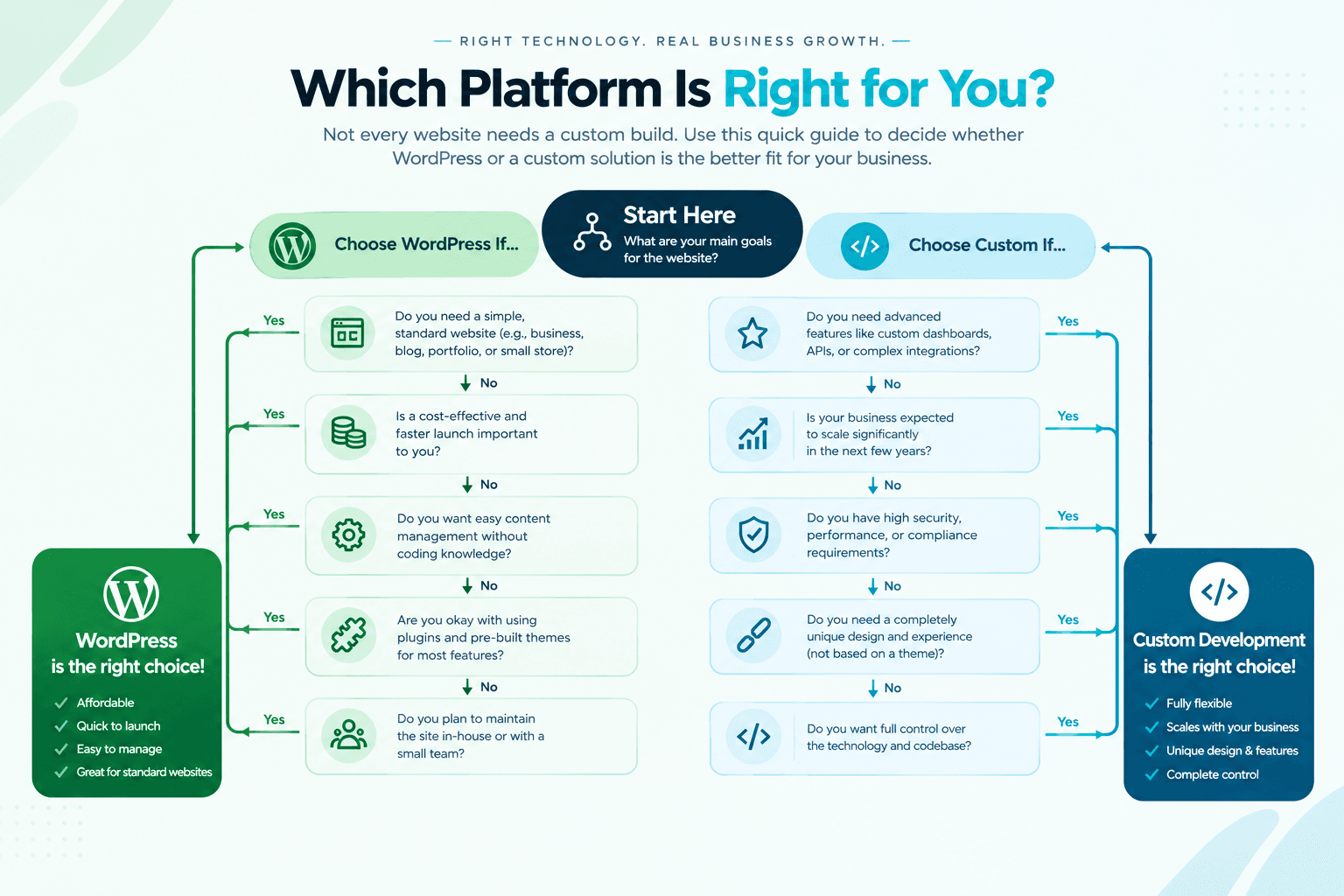
Choose WordPress if...
Be honest with yourself on these. Most Pakistani SMEs land here, and that's fine.
• Your team needs to publish content constantly blog posts, offers, events, products without waiting on a developer for every change.
• Your requirements are ordinary. Pages, a blog, a contact form, a gallery, maybe a basic shop. Thousands of businesses need exactly this, which is precisely why good plugins for it exist.
• Budget is tight, and you need to launch soon. A competent WordPress build gets you live for a fraction of a custom build's cost and timeline.
• You want a large pool of people who can take over. WordPress developers are easy to find and easy to replace anywhere in Pakistan. That's real risk reduction for a small business.
• You're validating something. If you're not yet certain what the business needs the website to do, spending heavily on a custom build is committing to a guess.
If you choose WordPress, choose it properly: a lightweight theme instead of a bloated multipurpose one, the smallest workable set of plugins, real hosting rather than the cheapest shared plan, and a named person responsible for updates every month.
Choose custom-built if...
• Your website is the product, not a brochure for it. A directory, a marketplace, a booking platform, a customer portal, anything with accounts and real logic. Bending WordPress into an application is possible, and it is usually the most expensive path: you pay for the workaround, then pay again when it breaks.
• You've hit the plugin ceiling. If your current site needs four plugins fighting each other to do one thing, that's the signal.
• Performance is commercially load-bearing. High-volume e-commerce, or any site where load time measurably costs you sales.
• You need integrations that don't exist as plugins a local payment gateway, an ERP or inventory system, a custom CRM.
• Your workflow doesn't look like anyone else's. Custom quoting logic, unusual approval flows, multi-tenant data.
• The page count is large and generated from data rather than hand-written property listings, business listings, a product catalogue with thousands of variations. Programmatically generated pages are where custom builds pull decisively ahead on both performance and SEO control.
The option most people skip: headless WordPress
If the deciding factor is "our marketing team must be able to edit everything themselves" but you need custom-level performance and flexibility, you don't have to choose.
Headless WordPress keeps WordPress as the admin panel with the same familiar editor and content workflow, while a custom front-end built on something like Next.js renders what visitors see. You get the editing experience and the performance, with a smaller public attack surface because the WordPress installation itself doesn't need to be exposed the way a traditional site does.
The trade-off is real: two systems to maintain instead of one, a higher build cost than standard WordPress, and you still carry WordPress's update burden on the back end. It suits content-heavy businesses with genuine publishing volume. It's overkill for a six-page company site.
The mistake both camps make
Choosing the platform before defining the requirements.
"Everyone uses WordPress" and "custom is more professional" are both statements about other people's websites. Neither tells you what yours needs to do.
Write down, before you talk to any developer: what the site must do on day one, what you expect it to do in two years, who will update the content and how often, what it must connect to, and what your monthly maintenance budget actually is. That document answers the platform question almost by itself, and it's the thing that makes agency quotes comparable, because everyone is finally quoting on the same scope.
Any developer who recommends a platform before asking those questions is telling you about their preferences, not your business.
So which one?
If your website is a shopfront that explains what you do, builds trust, and collects enquiries, WordPress, built with discipline, is very likely the right call, and anyone telling you otherwise should explain precisely why.
If your website is the business where customers transact, search, book or manage something, the custom route stops being a luxury and starts being the cheaper option over a three-year horizon, because you're no longer paying for workarounds.
And if you can't tell which one you are yet, that's not a platform problem. That's a scope problem, and it's worth solving before anyone quotes you for anything.
Not sure which side of that line you're on? Talk to the Green Pages web development team (https://greenpagespk.com/signup/services/web-development); we'll tell you if WordPress is the better fit for what you're describing. Or list your business for free (https://greenpagespk.com/signup) and start getting found while you decide.
Comments
Loading comments…
Sign in to join the conversation.